Webhooks
Webhooks let you subscribe to events happening in the k-ID Engine as they happen, as opposed to polling an API to see if data is available.
What are webhooks?
Webhooks can be used for a variety of purposes, such as:
- Handling challenge completion results
- Handling age verification results
- Handling changes in the k-ID Session
Setting up webhooks
Webhooks are configured in the Compliance Studio, by specifying a URL that the k-ID Engine calls when an event occurs. The URL must be a secure HTTPS URL. The k-ID Engine sends a POST request to the URL with a JSON payload that contains the event data.
Info
Webhooks are associated with individual Products. You can use the same endpoint for all of your k-ID Products if you have more than one, but it's important to note that you must retrieve the correct Product-specific k-ID API Key to make API calls (for example /session/get).
Webhooks can be configured in the Developer Settings section of your product in the Compliance Studio.
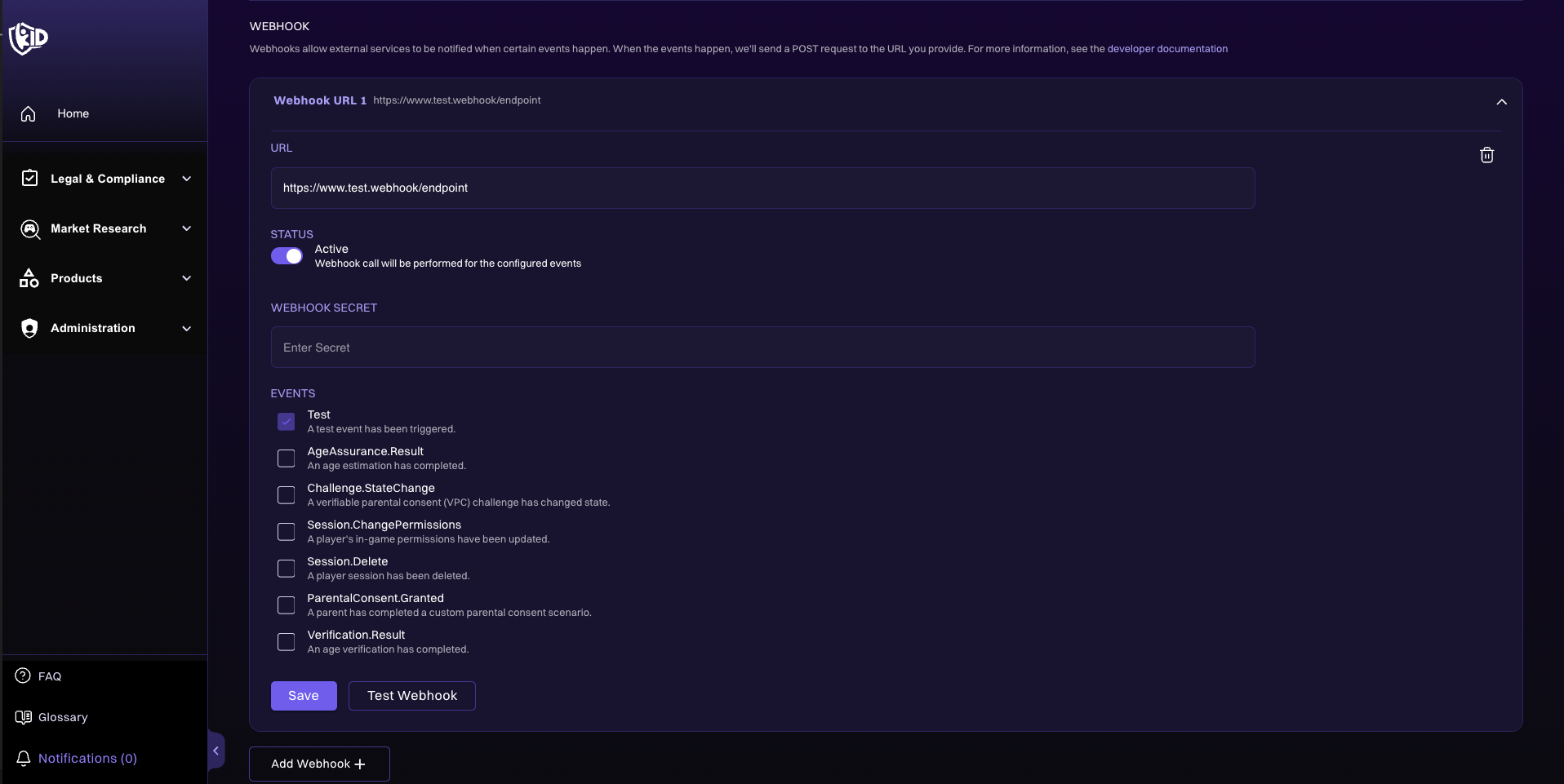
Webhook event structure
The JSON payload sent to the webhook URL contains the following fields:
eventType- The type of event that occurred.data- The data associated with the event.
An X-Event-Type header is also sent with the event type.
Validating webhook requests
Webhooks are sent over the public internet, so it's important to validate that the requests are coming from k-ID. This is done by verifying the event payload signature by using the configured webhook secret.
All requests include the following headers:
X-Signature-Timestamp- The timestamp of the request, in UNIX epoch seconds.X-Signature-Hmac-Sha256- The HMAC SHA-256 keyed-hash of the UTF-8 encoded timestamp and request body concatenated together, using the webhook secret as the key, encoded as a lowercase hexadecimal string.
If the signature is invalid, the request should be rejected with a 401 status code. Webhook requests with validated signatures can be processed and accepted with a 200 status code.
Example validation code
const crypto = require("crypto");

// Your webhook secret, configured in the [Compliance Studio](/compliance-studio/creating-product).
const SECRET = "your-secret";

const timestamp = req.get("X-Signature-Timestamp");
const signature = req.get("X-Signature-Hmac-Sha256");
const body = req.rawBody; // Raw request body, as a string.

// Compute the expected signature.
const hmac = crypto.createHmac("sha256", SECRET);
hmac.update(timestamp + body);
const expectedSignature = hmac.digest("hex");

// Compare signatures securely.
if (
  !crypto.timingSafeEqual(
    Buffer.from(signature, "hex"),
    Buffer.from(expectedSignature, "hex")
  )
) {
  return res.status(401).end("Unauthorized");
}
Event types
| Event Type | Description |
|---|---|
Challenge.StateChange | Emitted when a parental consent challenge changes state |
Verification.Result | Emitted with the result of a verification attempt |
Account.Delete | Emitted when an account is deleted |
AgeAssurance.Result | Emitted with the result of an Age Assurance evaluation (deprecated, replaced by Verification.Result) |
Session.ApproverEmailUpdate | Emitted when a parent changes the email address on their k-ID account, once per child session it approves |
Session.ChangePermissions | Emitted when session permissions are modified by a parent |
Session.Delete | Emitted when a session is deleted |
Session.Unlink | Emitted when a verified parent link ends, from either side |
Screentime.BreakReminder | Emitted when a player has been in one unbroken session for the parent-configured break interval |
Screentime.LimitWarning | Emitted at 15 and 5 minutes before today's screentime limit is reached |
Screentime.LimitReached | Emitted when a player's usage meets today's screentime limit |
Screentime.QuietHoursWarning | Emitted 15 minutes before a quiet-hours window starts |
Screentime.QuietHoursReached | Emitted when a quiet-hours window starts |
Screentime.ScheduleChanged | Emitted when a parent changes a player's screentime rules |
Screentime.OverrideResult | Emitted when a screentime override request is granted, denied, or expires |
Transaction.PurchaseApprovalResult | Emitted when a purchase-approval request is approved, denied, or expires |
Test | Used to verify that the webhook is working correctly |
For delivery guarantees, the retry policy, and signature validation, see the Webhooks overview.