2026 COPPA Rule Amendments
Configure your k-ID product for the COPPA Rule Amendments that take effect on April 22, 2026, including third-party disclosure links, per-feature consent for non-integral disclosures, and Data Notice updates.
Legal disclaimer
The information contained within this documentation is not intended to be a substitute for legal counsel and does not constitute legal advice. Please consult with your legal counsel for any questions regarding your compliance strategy.
The U.S. Children's Online Privacy Protection Act (COPPA) Rule Amendments take effect on April 22, 2026. This guide walks operators subject to COPPA through the configuration changes required in the k-ID Compliance Studio to meet the new obligations.
Who this guide is for
The new COPPA Rule Amendments apply to online operators that are considered "child-directed" under the law, which includes both services that target children directly and services that don't directly target children but might appeal to them. Use this guide alongside your legal counsel to update your product's configuration.
What's changing
Two parts of the amended Rule drive the configuration updates below:
- Expanded Verifiable Parental Consent (VPC) disclosures. Operators must include, in the VPC flow, a hyperlinked reference to a document that describes the third parties to which the operator discloses personal information and the purposes for those disclosures. This applies to all third-party recipients, whether the disclosure is integral to the service or not.
- Separate consent for non-integral disclosures. Disclosures of a child's personal information classified as non-integral to the service now require their own parental consent. The Federal Trade Commission (FTC) has held that disclosures of a child's personal information to third parties for monetary or other consideration, for advertising purposes (for example,
targeted-advertising), or to train or otherwise develop AI technologies, are non-integral to the online service.
Whether features beyond targeted advertising and AI training, such as text chat or push notifications, are "integral" is a judgment call that each operator must make based on their compliance strategy and risk appetite. Consult your legal counsel.
Step 1: Add a third-party disclosures link to Developer Details
The new Rule requires a hyperlinked reference to a document that describes the third parties to which you disclose personal information, and the purposes for those disclosures. The link can point to a dedicated subsection of your existing privacy policy.
- In the Compliance Studio, open your product and go to Developer Details.
- Click + Additional Legal Links and provide:
- The Title of the hyperlink (for example, "Third-Party Disclosures").
- The URL of the document or privacy-policy section.
- Save.
The new link is displayed alongside your Privacy Policy and Terms of Service in the parent-facing VPC flow.
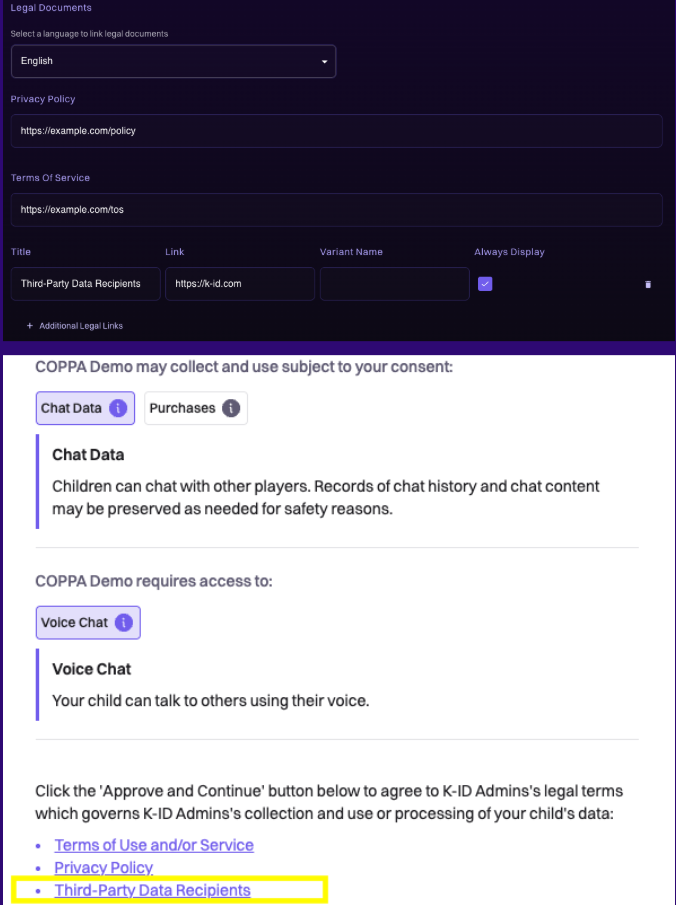
For the full set of options on this tab, including localized link titles and platform-specific variants, see Developer details.
Step 2: Identify non-integral features
Review your product's feature configuration and identify any features that:
- Involve sharing a child's personal information with a third party, and
- Aren't integral to the functioning of the service.
At a minimum, treat the following as non-integral per the FTC:
- Features that use personal information for targeted advertising (for example, the
targeted-advertisingpermission). - Features that send personal information to train or develop AI models.
If no features in your product meet both criteria, no further configuration changes are required and you can stop here. Otherwise, continue with the remaining steps for each affected feature.
Step 2(a): Remove the essential feature label
Non-integral features can't be bundled with the rest of the service as Essential; they require separate parental consent.
- In the Compliance Studio, open your product and go to Configuration → Permissions.
- Locate the non-integral feature and click Customize.
- Remove the Essential Feature label from the permission.


For background on how permissions, essential features, and consent interact, see Permissions and Essential features. For the Studio tab itself, see Permissions configuration.
Developer impact
Once a feature is no longer marked Essential, it's gated by the per-session permission set that the k-ID API returns. Your product must check the permission on each relevant session and disable the feature when the parent hasn't granted consent for it. Review the permission flags on the session by calling /session/get, and handle updates to a session's permissions via the session.changepermissions webhook. For background, see Sessions and Permissions.
Step 2(b): Amend the data notice
Update the product's Data Notice so that the data elements associated with each non-integral feature require parental approval. For example, if targeted-advertising relies on Advertising Identifiers, that data element must be marked as requiring parental approval.
- In the Compliance Studio, open your product and go to Notices → Data Notices.
- For each data element tied to a non-integral feature, mark the element as requiring parental approval.
- Save.
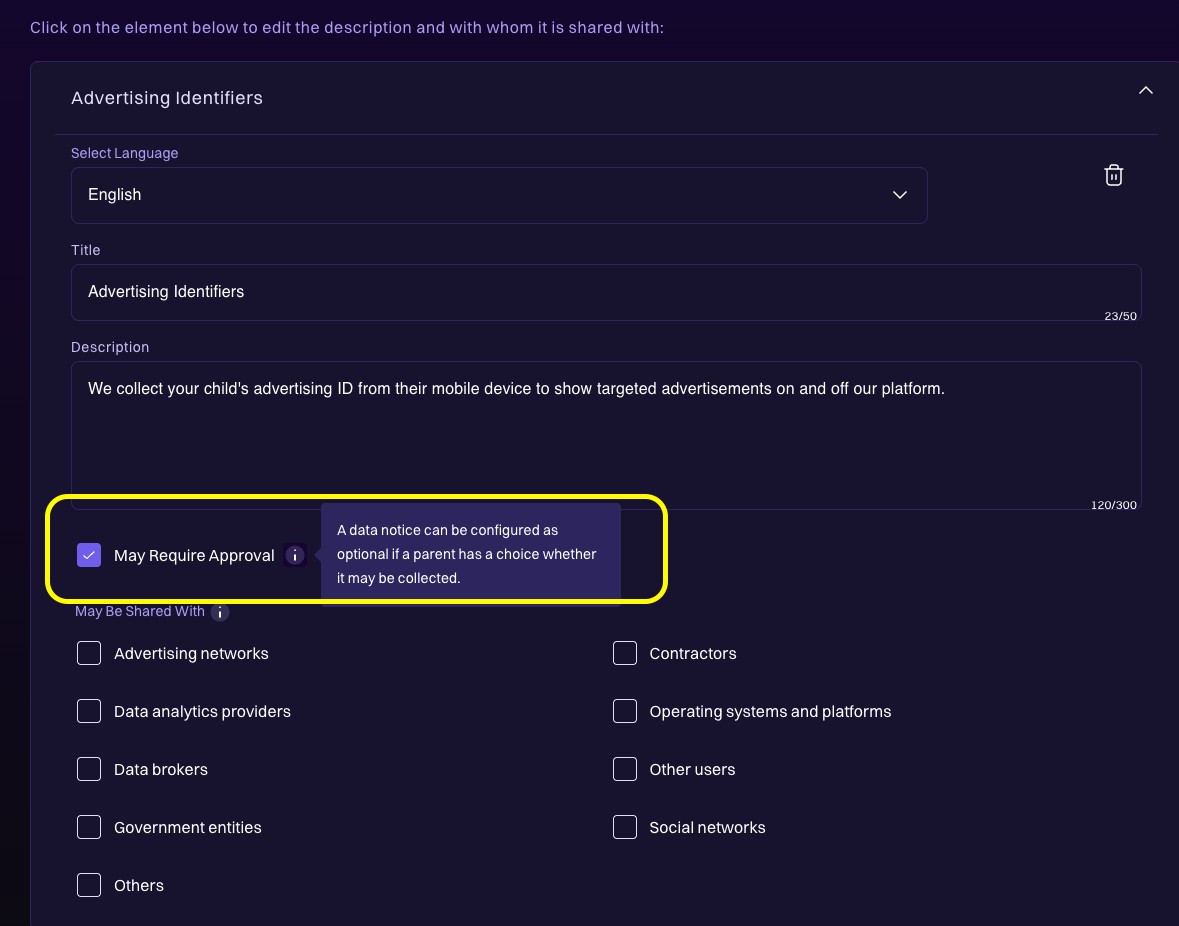
For more detail on the Data Notice configuration, see Data Notices and the Data notices concept page.
Recap
- Add a third-party disclosures hyperlink under Developer Details → + Additional Legal Links.
- For any feature that shares a child's personal information with a third party and isn't integral to the service:
- Remove the Essential Feature label under Configuration → Permissions.
- Update your code to read the per-session permission flags and disable the feature when consent hasn't been granted.
- Mark the related data elements as requiring parental approval under Notices → Data Notices.
Confirm each change with your legal counsel, validate the parent experience end to end in Test Mode, and update your product before April 22, 2026.