Age gate
An Age Gate is a mechanism used to collect and verify a user's age before allowing access to age-restricted content, features, or services. Age gates are required by regulations in many jurisdictions to ensure compliance with laws governing digital content access for minors.
What's an age gate?
Age gates serve several important purposes:
- Regulatory Compliance: Meet legal requirements for verification in different jurisdictions
- Content Protection: Prevent minors from accessing inappropriate content
- Data Privacy: Ensure proper handling of children's data according to regulations such as COPPA, GDPR-K, and others
- Parental Control: Enable parents to make informed decisions about their children's digital access
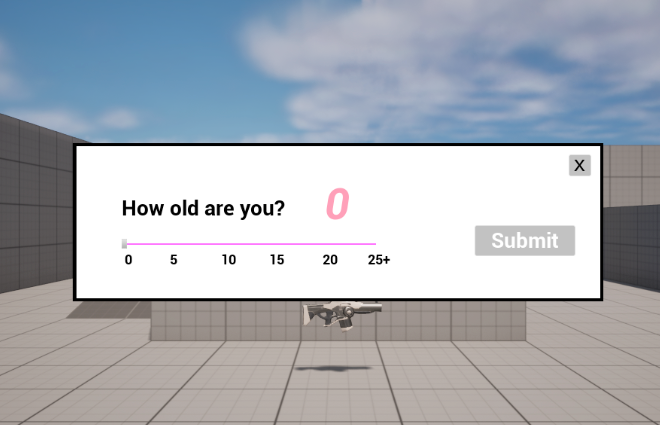
When's an age gate required?
To determine whether an age gate is required, call the /age-gate/get-requirements API with the player's jurisdiction. The API returns:
shouldDisplay: Whether an age gate should be displayed based on local regulationsapprovedAgeCollectionMethods: Which methods are allowed for collecting age in this jurisdictiondigitalConsentAge: The minimum age at which a player can provide digital consentcivilAge: The civil/contract age at which a player is considered a legal adultminimumAge: The minimum age required to access the platform/gameageAssuranceRequired: Whether age verification is required for players in this jurisdiction
If /age-gate/get-requirements responds with shouldDisplay = false, then no age gate should be shown and the player's date of birth isn't defined. In this case, the game still creates a Session by retrieving default permissions for the jurisdiction by calling /age-gate/get-default-permissions, which means that permissions don't vary based on age in this jurisdiction. Some features in a game might be prohibited for all age audiences based on jurisdiction, so the game should still consult the Session permissions to check whether a feature can be enabled.
Showing an age gate
If an age gate is required (shouldDisplay = true), the age gate UI should be shown, and the user must enter a date of birth to continue.
Certain jurisdictions are specific on whether an age gate can contain a slider, or must request an explicit date of birth. The allowed methods for collecting age are specified in the approvedAgeCollectionMethods field:
date-of-birth: Full date of birth (YYYY-MM-DD)age-slider: Age range or approximate age selectionplatform-account: Using existing platform account age verification
When showing an age gate, a best practice is to show a "neutral age gate," one which doesn't have an age already set so the user has to take action to set an age. Additionally, if the age gate uses a slider for the age value, it's recommended by the ESRB that the maximum age in a slider age gate should be 35.
Date of birth format
The date of birth can be provided in any of the following formats:
YYYY(year only)YYYY-MM(year and month)YYYY-MM-DD(full date of birth)
The jurisdiction determines which format is required or acceptable. Some jurisdictions require full date of birth, while others allow less precise age information.
Checking age for access
After the player provides their age, call /age-gate/check with the date of birth and jurisdiction to determine the next step in the workflow:
PROHIBITED: The player's age is below the minimum age for the game. The player should be blocked from continuing.CHALLENGE: The player must complete a challenge before accessing the product. Thechallenge.typefield distinguishes the sub-flow (for exampleCHALLENGE_PARENTAL_CONSENTfor Verifiable Parental Consent, orCHALLENGE_AGE_GATE_AGE_ASSURANCEwhen Automatic age assurance is enabled).PASS: The player can continue into the game. A session is created or returned on the response.
Handling age assurance
Some jurisdictions require age assurance in addition to the age gate itself. When the ageAssuranceRequired field returned from /age-gate/get-requirements is true, the game must verify claims beyond the digital consent age by using methods such as facial age estimation or ID document verification. You can satisfy this requirement in two ways:
- Run assurance yourself: Treat the age gate
PASSresponse as provisional and call/age-verification/perform-access-age-verificationbefore granting access. You control when and how verification is presented. See the Age verification quick start guide. - Let k-ID run assurance automatically: Enable Automatic age assurance on the product in the Compliance Studio. When enabled,
/age-gate/checkreturns aCHALLENGE_AGE_GATE_AGE_ASSURANCEchallenge for players who claim an age old enough to skip parental consent, and the session is created after the player passes the embedded verification. A trustworthy platform age signal can satisfy assurance without the challenge being issued. The feature is gated by an organization-level setting that only k-ID can grant.
If assurance fails or the age the player provided falls under the lowest value in the estimated age range, the player should be treated as the minimum age of that range. They either require trusted adult consent or are blocked altogether, depending on the minimum age configured for the game in the Compliance Studio.