UX guidelines
When building a custom age gate by using the k-ID API, follow these UX guidelines to create a compliant and user-friendly experience. These recommendations help ensure players can complete age verification smoothly while meeting regulatory requirements.
When to use these guidelines
These guidelines apply when you're building a custom age gate using the k-ID API directly. If you're using the k-ID embedded widget, the UX is already handled for you.
Age input methods
Your implementation should support at least two methods of collecting a player's age: an age slider or a date picker. Check the approvedAgeCollectionMethods field from the /age-gate/get-requirements endpoint to determine which collection methods are permitted for the player's jurisdiction.
Age slider
An age slider provides a simple, intuitive way for players to input their age. This is the recommended approach for most jurisdictions.
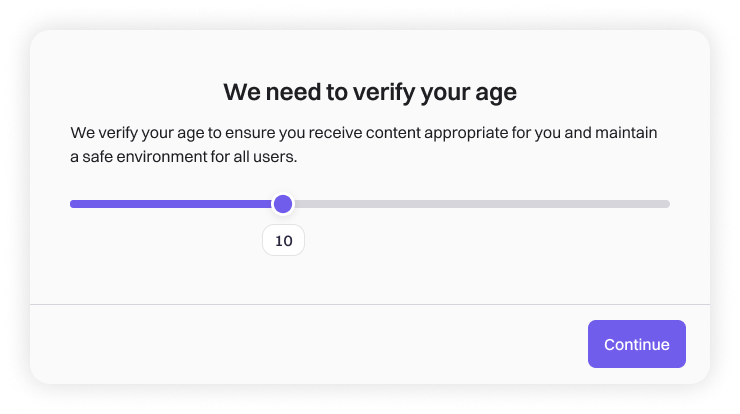
Design recommendations:
- Set the slider range from 0 to 35+ (per ESRB guidelines)
- Start in a neutral state with the default position at 0
- Keep the continue button inactive until the player interacts with the slider
- Display the selected age clearly as the player adjusts the slider
- Support keyboard navigation for accessibility
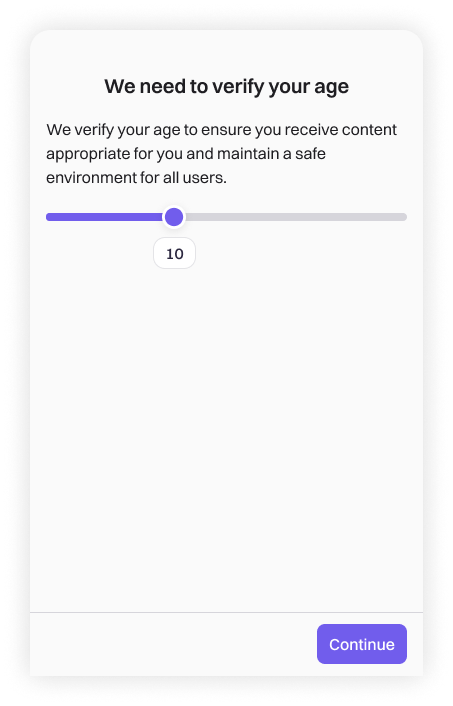
Mobile version:
Date picker
A date picker collects the player's full date of birth. This method is required in certain jurisdictions.
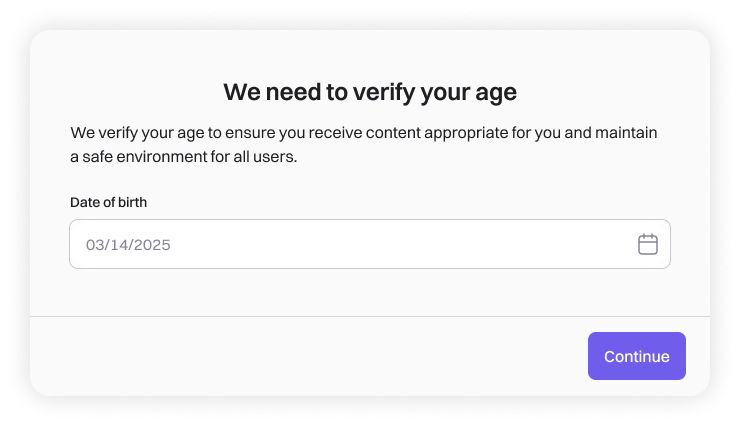
Design recommendations:
- Support day/month/year entry in the local date format
- Display clear validation messages for invalid dates
- Match the date format to local conventions (DD/MM/YYYY or MM/DD/YYYY)
Age confirmation
After collecting the player's age, display a confirmation screen before proceeding. This step helps prevent accidental errors and reinforces the importance of accurate age information.
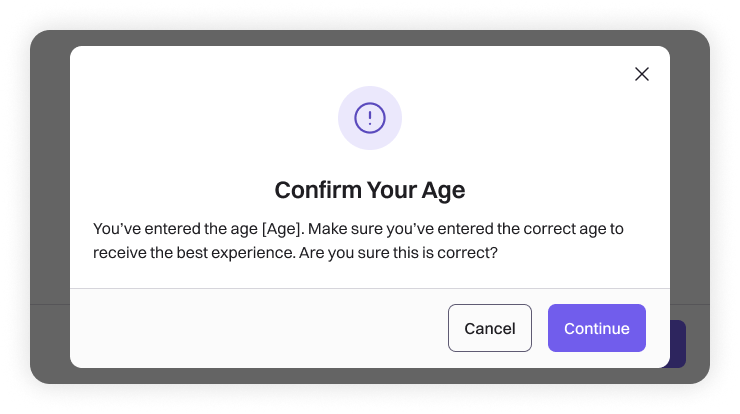
Design recommendations:
- Summarize the entered age or date of birth clearly
- Explain that the entered age affects the player's experience
- Provide clear options to go back and correct the age, or confirm and continue
Trusted adult consent
When a player is below the digital consent age for their region, they need approval from a trusted adult. Your UI should present all three consent methods to maximize completion rates.
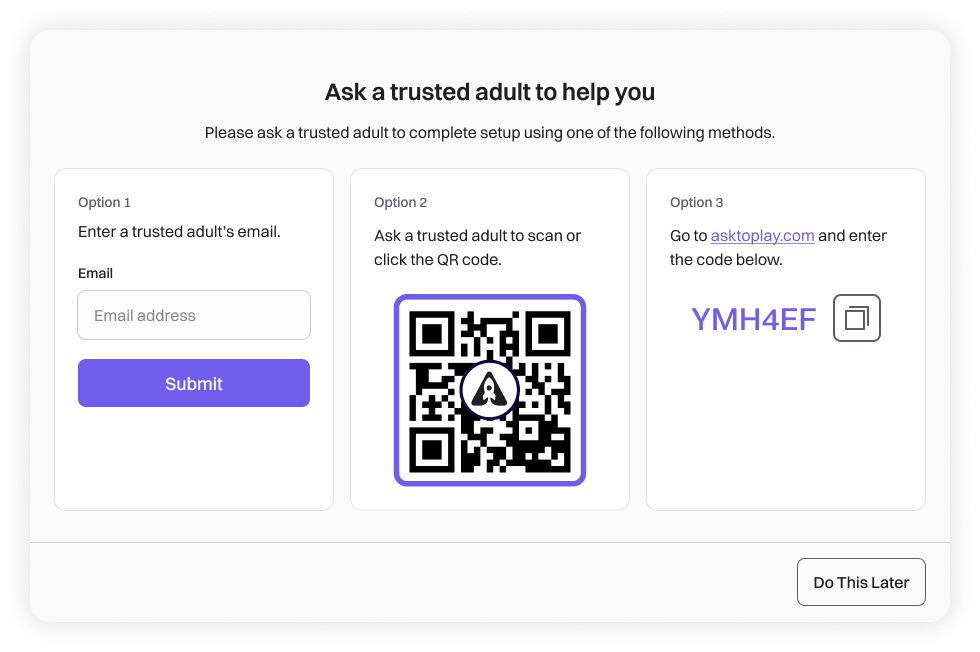
Consent methods
Provide these three options for the trusted adult to complete consent:
-
Email: Allow the player to enter a parent or guardian's email address. Call
/challenge/send-emailto send the consent request. -
QR code: Display a scannable QR code from the
challenge.urlfield. The trusted adult scans this with their phone to access the consent portal. -
Manual code entry: Display the
challenge.oneTimePasswordand direct the trusted adult to asktoplay.com to enter it.
Design recommendations
- Display all three options with equal visibility
- Include a "Do This Later" option for players who need to return later
- Add a copy button for the one-time code to improve usability
- Store the
challengeIdso players can resume the flow if they return before consent is granted
QR codes and one-time passwords expire
The QR code and one-time password expire after 1 hour and must be refreshed using the /challenge/generate-otp API. Design your UI to handle expiration gracefully by providing a refresh option or automatically regenerating credentials. For more details, see Challenge expiration and time-based authentication.
Data-lite mode
If your game supports data-lite mode, players under the digital consent age can access limited features while awaiting parental approval.
Design recommendations:
- Clearly communicate which features are available in data-lite mode
- Explain what additional features become available after consent is granted
- Provide a way for players to check consent status or resend the consent request
Accessibility
Ensure your custom age gate UI meets accessibility standards:
| Requirement | Implementation |
|---|---|
| Keyboard navigation | All interactive elements accessible via keyboard |
| Screen reader support | Appropriate ARIA labels and semantic HTML |
| Color contrast | Sufficient contrast for text and interactive elements |
| Tap targets | Minimum 44×44 pixel tap targets for buttons |
| Error messaging | Descriptive error messages that explain how to resolve issues |
Responding to permission changes
After the initial consent flow, permissions can change over time. Parents might adjust settings through Family Connect, players might age up to a new category, or sessions might be deleted. Your game should handle these changes gracefully and communicate them clearly.
For implementation details on detecting permission changes, see Managing sessions and permissions.
Communicating permission changes
When permissions change, display a clear notification that explains what happened. Players should never be left wondering why a feature suddenly became available or unavailable.
Design recommendations:
- Show a dialog or notification when the game detects permission changes
- Clearly list which features were enabled or disabled
- Explain the reason when possible (parent update, birthday, and similar)
- Use neutral, non-judgmental language
- Provide a clear dismissal action
Example messages:
| Scenario | Example message |
|---|---|
| Parent disabled features | "Your parent has updated your permissions. Voice Chat is no longer available." |
| Parent enabled features | "Your parent has enabled new features: Voice Chat, Public Profile." |
| Player aged up | "Your permissions have been updated based on your age." |
| Mixed changes | "Your permissions have been updated. Some features are now available, and others have been turned off." |
Displaying disabled features
When a feature is disabled, your UI should make it clear why and whether the player can take action.
Design recommendations:
managedBy value | UI treatment |
|---|---|
GUARDIAN | Show the feature as disabled with an "Ask Parent" option to request access |
PLAYER | Show the feature as disabled with an option to enable it |
PROHIBITED | Hide the feature entirely, or show it as unavailable without an action option |
- Don't show error states for disabled features, as they aren't errors
- Use visual treatments (dimmed appearance, lock icon) that clearly indicate restricted access
- For guardian-managed features, provide a path to request permission upgrades
Requesting additional permissions
When a player wants to enable a feature that requires parental consent, provide a clear path to request it.
Design recommendations:
- Show an "Ask Parent" or "Request Access" button for guardian-managed features
- Explain what the feature does and why it requires permission
- Present the same consent methods as the initial flow (email, QR code, manual code)
- Allow players to check the status of pending requests
- Confirm when a request has been sent successfully
Handling session deletion
When a session is deleted, the player must complete the age gate flow again. Handle this change smoothly.
Design recommendations:
- Explain that their session has ended and they need to verify their age again
- Don't display error messages that suggest something went wrong
- Preserve any non-permission-related progress or settings when possible
- Provide a clear call-to-action to restart the verification flow
Related resources
- Custom age gate quick start - Step-by-step implementation guide
- Managing sessions and permissions - Detecting and responding to permission changes
- Age gate - API documentation for age gate endpoints
- Best practices - General best practices for CDK integration